
Causes of obd2 code P206D
From what I’ve seen in the shop and what the manufacturer outlines, there are a few usual suspects when it comes to P206D:
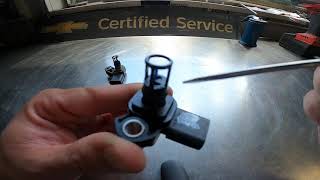
- Most often, the issue is a faulty DEF quality sensor itself-it just stops sending the right signal.
- Wiring problems, like corroded connectors, damaged wires, or poor grounds, are also high on the list. Even a little bit of moisture can cause trouble here.
- Sometimes, the DEF control module (DEF-C) can be at fault, especially if it’s not interpreting the sensor signal correctly.
- Less commonly, the ECM or the CAN bus wiring can have issues, but that’s not where I’d start.
From experience, I recommend checking the sensor and its wiring first before moving on to the more complex electronics.
Symptoms of P206D engine code
When this code is active, you’ll usually see the check engine light come on. In some cases, you might also get a warning about the DEF system or a message saying the vehicle will be limited in power soon. Most drivers won’t notice any changes in how the truck runs at first, but if you ignore it, the system can eventually put you into a reduced power or ‘limp’ mode to protect itself. That’s a surefire way to ruin a road trip or a workday.

Diagnosis steps for P206D code
Here’s how I tackle this one step by step:
- First, I always start with a visual inspection. Pop the hood and check the DEF tank area-look for any obvious damage to the sensor, wiring, or connectors. Sometimes you’ll spot corrosion or a loose plug right away.
- Next, I recommend disconnecting the sensor connector and checking for moisture or corrosion inside. Clean it out if you find anything.
- With the sensor unplugged, I use a multimeter to check for proper voltage and ground at the connector. If you’re not comfortable with this, it’s better to have someone assist you.
- If the wiring checks out, I’ll use a scan tool to look for any other related codes or communication errors between the DEF-C and ECM. Sometimes, a CAN bus issue will show up here.
- If everything else looks good, I’ll swap in a known-good DEF quality sensor to see if that clears the code. That’s usually the quickest way to confirm a bad sensor.
Don’t forget to check for any software updates or TSBs from the manufacturer-sometimes there’s a known issue with a simple fix.
Common mistakes when fixing P206D trouble code
One thing I see a lot is folks jumping straight to replacing the sensor without checking the wiring first. That’s a good way to waste money. Another common mistake is ignoring the connectors-just a little bit of corrosion can throw the whole system off. Also, some people clear the code without fixing the root problem, which just kicks the can down the road. It’s best to be thorough and check each step before replacing parts.

How serious is P206D
This isn’t something you want to put off. If you ignore P206D, the DEF system can eventually limit your engine power or even prevent the vehicle from starting after a certain number of drive cycles. That’s a serious hazard, especially if you’re far from home or in heavy traffic. Plus, running with a faulty DEF system can lead to increased emissions and potential damage to the SCR (Selective Catalytic Reduction) system, which is expensive to fix. Honestly, you don’t want this kind of trouble on the road.
Repair steps for dtc P206D
Here’s what I usually do to fix P206D:
- Replace the DEF quality sensor if it’s confirmed to be faulty.
- Repair or replace any damaged wiring or connectors between the sensor and the DEF control module.
- If the DEF-C is at fault, follow the OEM procedure to replace or reprogram it.
- Clear the code and perform a system test drive to make sure everything’s working right.
- In rare cases, if there’s a communication issue, repair the CAN bus wiring or update the ECM/DEF-C software as needed.
It’s best to start with the simple stuff-wiring and connectors-before moving on to sensor or module replacement.

Conclusion
To sum it up, P206D means your vehicle’s DEF quality sensor is reading too high, which can mess with your emissions system and eventually leave you stranded. Diagnosing it is pretty straightforward if you start with the basics: check the wiring, connectors, and sensor itself. Don’t put this off, because things can go south quickly if overlooked. The most reliable fix is to address any wiring issues and replace the sensor if needed. That way, you’ll keep your truck running clean and avoid bigger headaches down the line.
 5045
5045 5 minutes of reading