
Causes of P2477 trouble code
From experience, the root of this problem usually comes down to the sensor or its wiring. Here’s what I’ve found most often triggers P2477, both from the official repair manuals and years of wrenching on these trucks:
- Faulty exhaust gas temperature sensor (EGTS) at bank 2, sensor 4
- Wiring harness issues-think broken wires, shorts, or open circuits leading to the sensor
- Poor connection at the plug: corrosion, loose pins, or that classic click that isn’t quite right
- Exhaust leaks creeping in near the sensor, which can throw the readings off
- Soot or carbon caked up on the sensor tip causing it to read wrong
No matter if you’re under the hood of a Chevy, Ford, or GMC, these troublemakers are usually to blame for this code.
Symptoms associated with P2477
When this code pops up, the first thing you’re likely to notice is that dreaded check engine light staring back at you. Sometimes you’ll also get a message about the emissions system, or a warning to service the engine soon. Oddly enough, most of the time the truck drives just fine at first-no stumbles, no loss of power. But don’t let that fool you. If you ignore it, the computer might eventually put the engine into reduced power mode to protect itself. In my experience, real drivability issues are rare in the early stages, but that doesn’t mean you should drag your feet on the fix.

Diagnosis steps for P2477 engine code
Here’s the approach I’ve honed over the years for getting to the bottom of P2477:
- Give everything a good once-over. Pop the hood and inspect the wiring to the exhaust gas temperature sensor at bank 2, sensor 4. Burns, cuts, melted spots-those are red flags.
- Check the sensor’s connector. Make sure it’s clicked in all the way and look for bent or corroded pins. Try wiggling the wires while keeping an eye on your scan tool for signal drops-sometimes that’s all it takes to spot a problem.
- Scan for exhaust leaks around the sensor. Even a tiny leak can mess up the readings.
- Hook up a scan tool and watch the sensor’s live data. Compare its numbers to the other exhaust temp sensors. If one is way out of line or bouncing all over, you’ve found your suspect.
- Unplug the sensor and check its resistance with a multimeter. If the reading is open or nowhere near spec, odds are the sensor’s toast.
- If the wiring and sensor seem okay, pull the sensor and check for soot buildup on the tip. Sometimes a cleaning helps, but often you’ll just need a new one.
Don’t skip clearing the code and taking the truck for a drive after repairs. If the code stays gone, you’ve nailed it. If it comes back, time to dig a bit deeper.
Common mistakes when fixing dtc P2477
I can’t count how many times I’ve seen folks replace the sensor first and ask questions later. Don’t do it-always check the wiring and connector before you shell out for a new sensor. Another classic misstep is missing a hairline exhaust leak near the sensor. Those leaks can be tricky and easy to overlook. Corroded connectors are another trouble spot; it takes just a bit of green gunk to cause a real headache. And don’t forget to compare the sensor’s readings to the others-sometimes what looks like a bad sensor is actually a wiring issue further up the line.

Seriousness of obd code P2477
This is one of those codes you really shouldn’t ignore. Even if your truck’s running fine now, a faulty exhaust gas temperature sensor can set you up for major trouble later. If the computer can’t watch exhaust temps properly, it might not protect the DPF or DOC as it should. That can mean overheating, or worse, damaging those pricey components. Worst case? You’re looking at a clogged DPF or a failed catalyst-both expensive fixes. Take my advice: tackle this code sooner rather than later, or you could be in for a much bigger repair bill.
Repair solutions for obd2 code P2477
Here’s what gets P2477 off the radar in my shop, using both hands-on experience and what the OEMs recommend:
- Swap out the bad exhaust gas temperature sensor (bank 2, sensor 4)
- Repair or replace any damaged wiring or connectors you find
- If the sensor tip is gummed up with soot, try cleaning it, but don’t be shy about replacing it if needed
- Seal up any exhaust leaks near the sensor
- Clear the code and take the truck for a solid test drive to confirm you’ve fixed the issue
My advice? Always start with the easy stuff-wiring and connections-before you pony up for a new sensor.

Conclusion
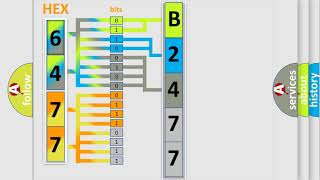
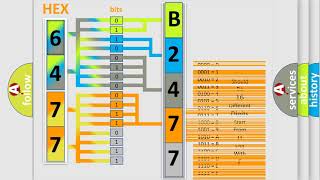
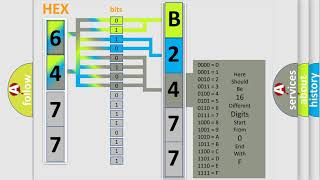
Bottom line: P2477 means your vehicle’s computer isn’t happy with the exhaust gas temperature sensor signal from bank 2, sensor 4. Don’t ignore it, because letting this slide can lead to major emissions system damage and a much bigger dent in your wallet. The right move is a careful inspection of wiring and the sensor itself, fix or replace what’s needed, and always double-check with a test drive. Staying on top of this keeps both your engine’s health and your bank account in the clear.

 5495
5495 5 minutes of reading